> For the complete documentation index, see [llms.txt](https://docs.valtimo.nl/llms.txt). Markdown versions of documentation pages are available by appending `.md` to page URLs; this page is available as [Markdown](https://docs.valtimo.nl/v12/features/plugins/configure-catalogi-api-plugin.md).
# Catalogi API plugin
{% hint style="success" %}
The Catalogi API plugin is a ZGW plugin and can only be used in the GZAC edition.
{% endhint %}
The Catalogi API plugin can be used to access data stored in a ZGW (zaakgericht werken) catalogue. This is based on the Catalogi API standard created and used by the Dutch government.
## Configure the plugin
A plugin configuration is required before the plugin can be used. A general description on how to configure plugins can be found [here](/v12/features/plugins.md#configuring-plugins).
If the Catalogi API plugin is not visible in the plugin menu, it is possible the application is missing a dependency. Instructions on how to add the Catalogi API dependency can be found [here](/v12/fundamentals/getting-started/modules/zgw/catalogi-api.md).
To configure this plugin the following properties have to be entered:
* **URL (`url`).** Contains the complete base URL of the Catalogi API to connect to. This generally includes the path `/api/v1/`.
* **Authentication plugin configuration (`authenticationPluginConfiguration`).** Reference to another plugin configuration that will be used to add authentication to any request performed on the Catalogi API. If no option is available in this field a plugin has to be configured that is able to authenticate for the specific application that hosts the Catalogi API. (e.g. OpenZaak)
An example plugin configuration:
## Available actions
The Catalogi API plugin supports the following actions that can be configured in process links in order to retrieve type data.
A general description on how to create process links can be found [here](/v12/features/process/process-link.md#creating-a-plugin-process-link).
### Retrieve statustype
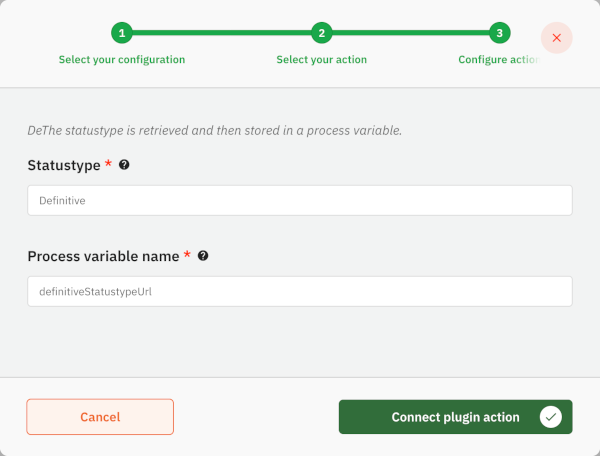
This action retrieves the statustype URL using the statustype description, and will assign it to a process variable.
When creating a process link the following properties have to be entered:
* **Statustype**. This description will be used to lookup the full statustype URL
A full URL can also be set here. In that case, the value will be used directly without a lookup.
* **Process variable name**. This is the name of the process variable which value will be set to the found statustype URL.
An example action configuration:
### Retrieve resultaattype
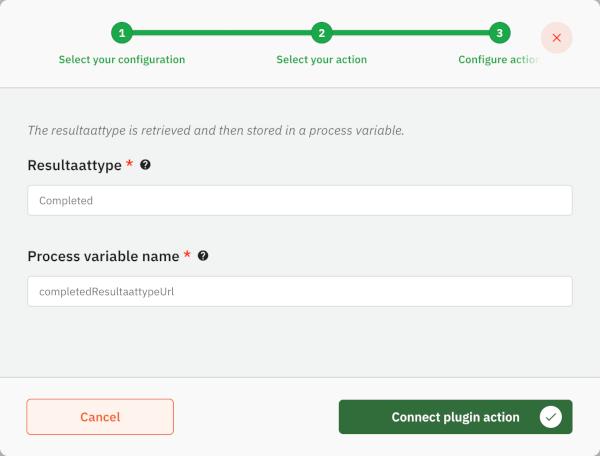
This action retrieves the resultaattype URL using the resultaattype description, and will assign it to a process variable.
When creating a process link the following properties have to be entered:
* **Resultaattype**. This description will be used to lookup the full resultaattype URL
A full URL can also be set here. In that case, the value will be used directly without a lookup.
* **Process variable name**. This is the name of the process variable which value will be set to the found resultaattype URL.
An example action configuration:
### Retrieve besluittype
This action retrieves the besluittype URL using the besluittype description, and will assign it to a process variable.
When creating a process link the following properties have to be entered:
* **Besluittype**. This description will be used to lookup the full besluittype URL
A full URL can also be set here. In that case, the value will be used directly without a lookup.
* **Process variable name**. This is the name of the process variable which value will be set to the found besluittype URL.
An example action configuration:
.png?alt=media)