# Forms

Valtimo uses the [Form.io](https://www.form.io/) form builder to create forms that can be used for multiple purposes, such as:

* Task forms
* Process start forms
* Case detail view

## Translations

To display forms in different languages, we can utilize translations. This involves translating all the labels based on their label property, and using a function `instance.t('translationKey')` to display content from the translation file inside the htmlContent.

An example of a translated form.io definition:

```json
{
  "display": "form",
  "components": [
    {
      "key": "html",
      "type": "htmlelement",
      "input": false,
      "label": "HTML",
      "content": "<p>{{ instance.t('contentX') }}</p>",
      "tableView": false,
      "refreshOnChange": false
    },
    {
      "key": "isApproved",
      "type": "radio",
      "input": true,
      "label": "configurationApproved",
      "inline": false,
      "values": [
        {
          "label": "yes",
          "value": "true",
          "shortcut": ""
        },
        {
          "label": "no",
          "value": "false",
          "shortcut": ""
        }
      ],
      "default": true,
      "tableView": false,
      "defaultValue": false,
      "optionsLabelPosition": "right"
    },
    {
      "key": "comment",
      "type": "textarea",
      "input": true,
      "label": "comment",
      "tableView": true,
      "autoExpand": false
    },
    {
      "key": "send",
      "type": "button",
      "input": true,
      "label": "send",
      "tableView": false,
      "customClass": "float-right",
      "saveOnEnter": false,
      "showValidations": false
    }
  ]
}
```

Where form.io definition is using the following translation properties:

```json
{
  "formioTranslations": {
    "contentX": "This is content text which is set by the instance.t() function",
    "ConfigurationApproved": "Configuration approved?",
    "yes": "Yes",
    "no": "No",
    "comment": "Comment",
    "send": "Send"
  }
}
```

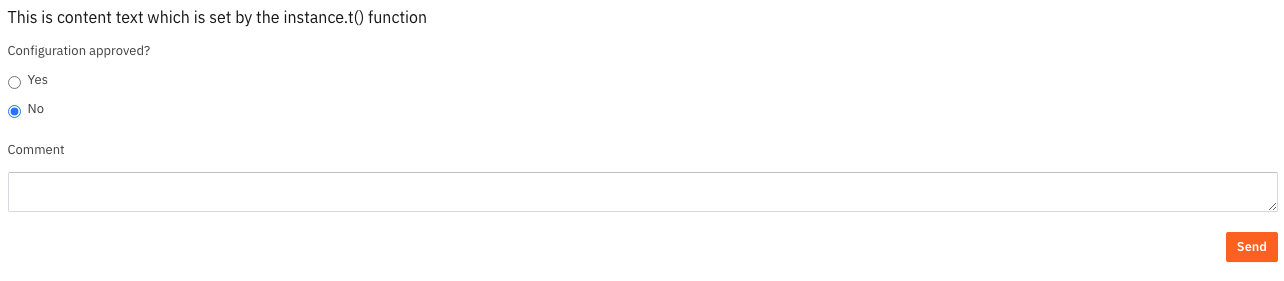
Which results in:

<figure><img src="/files/bpEnjVh7nwiOA2TRi4rC" alt=""><figcaption></figcaption></figure>


---

# Agent Instructions: Querying This Documentation

If you need additional information that is not directly available in this page, you can query the documentation dynamically by asking a question.

Perform an HTTP GET request on the current page URL with the `ask` query parameter:

```
GET https://docs.valtimo.nl/v12/features/forms.md?ask=<question>
```

The question should be specific, self-contained, and written in natural language.
The response will contain a direct answer to the question and relevant excerpts and sources from the documentation.

Use this mechanism when the answer is not explicitly present in the current page, you need clarification or additional context, or you want to retrieve related documentation sections.
