> For the complete documentation index, see [llms.txt](https://docs.valtimo.nl/llms.txt). Markdown versions of documentation pages are available by appending `.md` to page URLs; this page is available as [Markdown](https://docs.valtimo.nl/configuration-guides/plugins/external-plugins/manage-an-integration.md).
# Manage an integration
Connected plugin hosts and apps are managed from their row menu (⋮) on the **Plugin hosts** and **Apps** pages. Each concern has its own small dialog, so a change touches exactly one thing.
***
## Editing the connection
Use **Edit connection** when a host moved to a new address, its admin token was rotated, the callback URL changed, or the event broker moved. This keeps the integration and everything configured on it — configurations, process links, tabs — intact.
{% stepper %}
{% step %}
Open the integration's row menu (⋮) and click **Edit connection**
{% endstep %}
{% step %}
Change only the fields that changed
Edit connection
{% endstep %}
{% step %}
Click **Save**
{% endstep %}
{% endstepper %}
Field behavior in this dialog:
| Field | Behavior |
| ---------------- | ------------------------------------------------------------------------------------------------------------------------------------------------------------------------------- |
| Secret | Shown empty — leave blank to keep the current secret; type a value to replace it. Re-entering the current secret counts as unchanged. |
| Event broker URL | Shown with the credentials masked (`***`). Leaving the masked value untouched keeps the stored broker; clearing the field disables events for this integration. |
| Other fields | An unchanged field is simply not sent; a changed field is validated exactly like during registration — including the deployment's allowed-address list, when one is configured. |
After saving, Valtimo immediately re-checks the integration and re-sends every configuration — this is also what reconnects event delivery after a broker change.
Changing the address, the secret, or the event broker URL is also treated as a security event: every access token previously issued for this integration's configurations is revoked on the spot. The re-send delivers fresh tokens, so a healthy integration recovers immediately, while anything that still holds an old token is locked out. When the address changed, Valtimo also removes the configurations from the old address, so nothing usable stays behind there.
Right after an address or secret change the integration briefly shows **Unreachable** — the old status vouched for the old connection — and turns **Connected** again on the first successful check-in. Every connection change is recorded in the application log with who made it; secrets and broker credentials are never written out.
{% hint style="warning" %}
Rotating the secret is two-sided: the host must be restarted with the matching admin token. Until both sides match, Valtimo cannot reach the host (its status becomes Unreachable); everything recovers on the first check-in after they match again.
{% endhint %}
{% hint style="info" %}
After a base URL change the page asks for a reload — the security policy that allows embedding plugin screens is applied when the page loads.
{% endhint %}
***
## Event queue settings
**Edit event queue** controls what happens to events while the integration is down:
Edit event queue
| Mode | Behavior |
| ------------------ | -------------------------------------------------------------------------------------------------------------------------------------------------------------------------------------------------------------------------------------------------------------------------------------------------------------------------------------------------------------------------------------------------------- |
| **Live** (default) | Events published while the integration is down are lost. No queue cleanup ever needed. |
| **Durable** | Events are retained while the integration is down and delivered when it returns. The **inactivity TTL** (default 72 hours, between 1 hour and 30 days) removes the queue after that long without a connected integration, so a decommissioned one does not accumulate events forever. Once the TTL runs out, the retained events go with the queue: the integration resumes from empty, as in Live mode. |
A mode or TTL change takes effect immediately — no restart of either side.
{% hint style="warning" %}
**Changing the mode or the TTL starts a new queue.** The setting is part of the queue's identity, so the integration begins consuming from a fresh, empty one. Anything still waiting in the old queue is never delivered — change these settings while the integration is connected and caught up, not while it is down with events banked up. The abandoned queue disappears on its own once its own TTL expires; ask whoever operates the message broker to remove it sooner if that matters.
{% endhint %}
***
## Frontend origins
**Edit frontend origins** maintains the list of browser origins allowed to embed this integration's plugin screens (case tabs, task forms, widgets, pages).
Edit frontend origins
Add every URL users open the Valtimo frontend from — including reverse-proxy aliases — as a bare origin (`scheme://host[:port]`, no path, no wildcards). With no origins listed, no page can embed this integration's plugin screens: the browser blocks them, so the screens never finish loading.
***
## Deleting configurations and integrations
Deletion is strict by design: anything still in use cannot be deleted, and there is no force override.
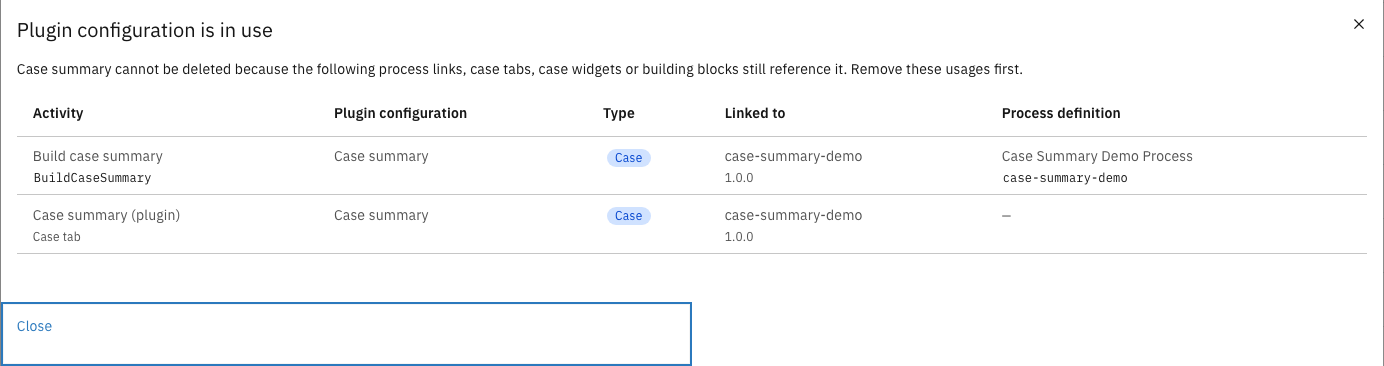
* A **plugin configuration** cannot be deleted while any process link, case tab, case widget, menu page, or building block references it. The dialog lists every usage so it can be unbound first.
Configuration in use
* An **integration** cannot be deleted while any of its configurations is still referenced, or while a building block still links one of its plugin versions. Its unreferenced configurations are removed along with it.
{% hint style="danger" %}
Deleting a configuration that is not in use is permanent: its accepted permissions and settings are removed, and every token issued for it stops working immediately.
{% endhint %}
{% hint style="info" %}
This mirrors why published case definitions are immutable: a process that ran yesterday must still be explainable tomorrow. Remove the references first — then the delete is allowed.
{% endhint %}