> For the complete documentation index, see [llms.txt](https://docs.valtimo.nl/llms.txt). Markdown versions of documentation pages are available by appending `.md` to page URLs; this page is available as [Markdown](https://docs.valtimo.nl/configuration-guides/plugins/external-plugins/add-an-app.md).
# Add an app
An app is a remote service that provides exactly one plugin, built in. Unlike a plugin host it accepts no uploads — connecting the app *is* installing the plugin. Because of that, adding an app is a single guided flow: connect, enter the plugin's settings, and accept its permissions.
Before starting, have the app's **base URL** and **secret** (its admin token) from the team operating the app.
***
## Adding an app
{% stepper %}
{% step %}
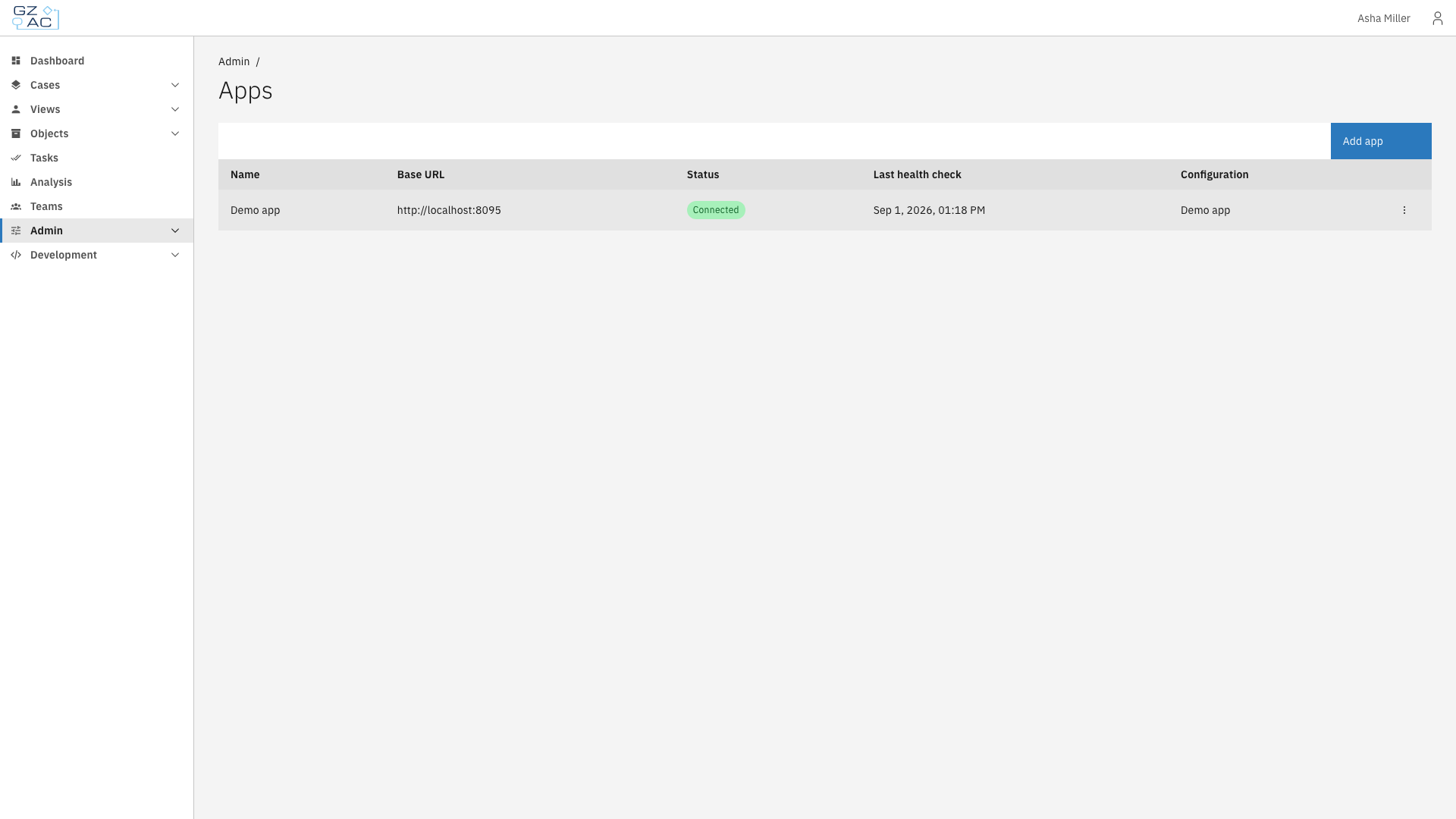
Expand **Admin** in the left sidebar and click **Apps**
Apps page
{% endstep %}
{% step %}
Click **Add app**
{% endstep %}
{% step %}
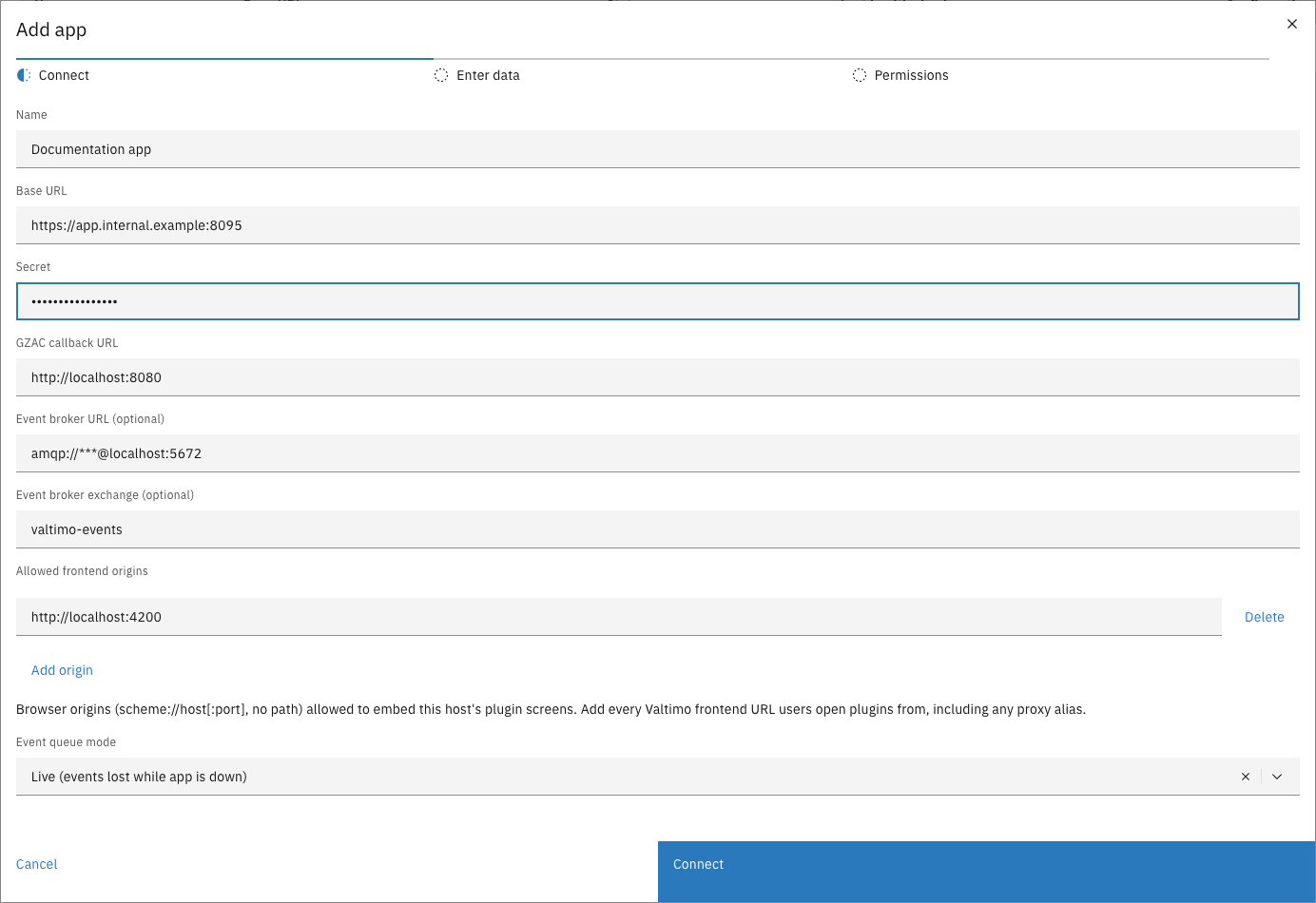
Fill in the connection details and click **Connect**
Add app — Connect step
Valtimo connects to the app and retrieves its plugin immediately. The fields are listed under [What you fill in](#what-you-fill-in) below.
{% endstep %}
{% step %}
In the **Enter data** step, name the configuration and fill in the plugin's settings
When the app ships its own settings screen, this step shows it, so the app can explain and validate its own fields. An app without one gets a generic form instead: a configuration name plus the settings as JSON, validated against the plugin's schema when you save.
{% endstep %}
{% step %}
In the **Permissions** step, review what the plugin requests, tick **I trust this plugin and accept the requested permissions**, and click **Save configuration**
What each section means is listed under [Reviewing the permissions](#reviewing-the-permissions) below.
{% endstep %}
{% endstepper %}
### What you fill in
| Property | Description |
| ------------------------ | -------------------------------------------------------------------------------------------------------------------------------------------------------------------------------------------------------------------------------------------- |
| Name | Display name for this app. |
| Base URL | URL where Valtimo reaches the app. |
| Secret | The app's admin token. Valtimo uses it to sign every request to the app, so it must match the value the app was started with. At least 16 characters. Stored encrypted; never shown again. |
| Allowed frontend origins | The browser origins (`scheme://host[:port]`, no path) allowed to embed this app's plugin screens. Add every URL users open the Valtimo frontend from, including proxy aliases. With no origins listed, no page can embed this app's screens. |
### Pre-filled — change only when told to
These arrive filled in with values that are correct for a standard environment. Change them only on instruction from the team operating the app or the platform.
| Property | Description |
| -------------------------------- | ----------------------------------------------------------------------------------------------------------------------------------------------------------------------------------------------------------------------------------------------------------------------------------------------------------------------------------------------------------------------------------------------------------------------------------------------------------------------------------------------------------------------------------------------------------------------- |
| GZAC callback URL | The URL the app uses to call back into this Valtimo environment. Change it when the app reaches Valtimo on a different address than the default — for example when the two run in separate containers. |
| Event broker URL (optional) | The message broker address the app receives events from. Pre-filled from the platform's own broker with the credentials masked as `***` — leaving the masked value in place uses the platform credentials. Leave empty to disable events for this app. |
| Event broker exchange (optional) | The exchange events are read from. The pre-filled default matches what Valtimo publishes to. |
| Event queue mode | **Live** — events published while the app is down are lost. **Durable** — events are retained while the app is down and delivered when it returns. Durable mode asks for an inactivity time-to-live, entered in milliseconds (default 72 hours, between 1 hour and 30 days). Stay disconnected longer than the TTL and the queue and everything waiting in it are deleted; the app then resumes from an empty queue. Also changeable later — see [Manage an integration](/configuration-guides/plugins/external-plugins/manage-an-integration.md#event-queue-settings). |
{% hint style="warning" %}
The base URL must use HTTPS (or point at localhost during development). Everything Valtimo sends the app with a configuration — an access token, the plugin's secret settings, any event broker credentials — travels over that connection, so a plain-HTTP remote address is refused.
{% endhint %}
### Reviewing the permissions
The permissions step is the security decision of the whole flow: everything listed becomes available to the app's plugin, and nothing else ever is. It shows up to four sections:
| Section | Meaning |
| ------------------------ | ------------------------------------------------------------------------------------------------------------------------------------------------------------------------------------------------------------------------------- |
| **Host capabilities** | Broad abilities, such as calling the Valtimo API (`gzac_api`), making outbound HTTP requests (`http_request`), storing key–value data (`kv`), writing logs (`log`), and serving data to its own screens (`frontend_data`). |
| **API endpoints** | Exactly which Valtimo API endpoints the plugin may call, with a description of each. This list bounds everything it can read or change in Valtimo. |
| **Events** | The platform events the plugin will receive. |
| **External connections** | The outside addresses the plugin can connect to — and nothing else. Addresses come from the plugin itself ("Required by the plugin") or from a URL entered in this configuration's settings. Check that you recognize each one. |
Accepting is all-or-nothing and must match what the plugin declares — the request list cannot be edited. If an app asks for more than it should need, do not connect it; contact its supplier. Accepted permissions are enforced at runtime on every call, not just checked at activation.
***
## After connecting
The app appears on the Apps page with its linked configuration. The configuration is also managed from this page — editing, logs, and deletion live in the app's row menu, not on the Plugins page.
{% hint style="info" %}
If the connection fails, the reason appears in the dialog — check the base URL and secret and click **Connect** again. If the app was added but its plugin is not ready yet, the app is saved anyway and the dialog offers **Retry** — Valtimo finishes the job automatically once the app becomes reachable, and the configuration can be completed later from the Apps page.
{% endhint %}
{% hint style="warning" %}
**An app can only be connected once.** If the plugin it provides is already registered by another integration, the dialog reports which registration holds it and stops. Connect the app once, or remove the existing registration first.
{% endhint %}
{% hint style="warning" %}
**Accepting an app pins its manifest.** From here on, that version means exactly the manifest that was accepted. If the app later changes its manifest in place under the same version, the app stops running and is tagged **Review required** until an administrator accepts the new footprint — see [Resolving it on an app](/configuration-guides/plugins/external-plugins/plugin-status-and-reviews.md#resolving-it-on-an-app). For a genuinely new footprint, have the app publish a new version instead.
{% endhint %}
{% hint style="info" %}
When an app serves plugin screens (such as a case tab), the page may ask for a refresh before the configuration step — security policy for a newly connected app's screens is applied when the page loads.
{% endhint %}