> For the complete documentation index, see [llms.txt](https://docs.valtimo.nl/llms.txt). Markdown versions of documentation pages are available by appending `.md` to page URLs; this page is available as [Markdown](https://docs.valtimo.nl/configuration-guides/access-control/roles.md).
# Roles
Roles are containers for permissions. Each role maps to a Keycloak role — users with a given Keycloak role inherit all permissions configured for that role in Valtimo.
***
## Creating a role
{% stepper %}
{% step %}
Navigate to **Admin** in the sidebar
{% endstep %}
{% step %}
Click **Access Control**
{% endstep %}
{% step %}
Click **Add new role**
{% endstep %}
{% step %}
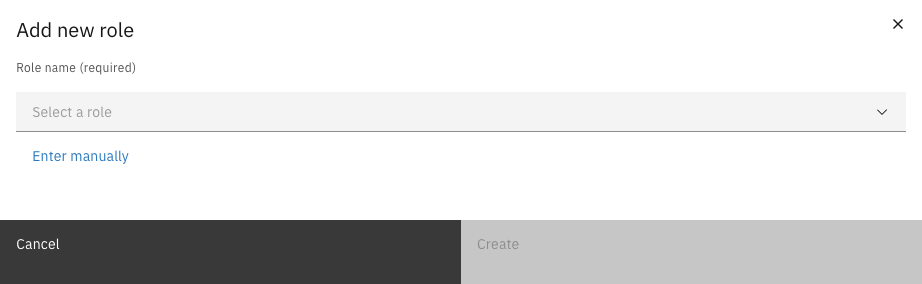
Select a role from the dropdown, or click **Enter manually** to type a custom role key
Add role modal
{% endstep %}
{% step %}
Click **Create**
{% endstep %}
{% endstepper %}
{% hint style="info" %}
The dropdown shows roles from Keycloak that are not yet configured in Valtimo. Use **Enter manually** when the role does not exist in Keycloak yet or when you need a custom key.
{% endhint %}
***
## Editing a role
To rename a role:
{% stepper %}
{% step %}
Click on the role in the list to open its editor
{% endstep %}
{% step %}
Click the **More** menu (three dots) in the header
{% endstep %}
{% step %}
Select **Edit**
{% endstep %}
{% step %}
Enter the new role key and click **Save**
{% endstep %}
{% endstepper %}
***
## Deleting roles
{% stepper %}
{% step %}
Select one or more roles using the checkboxes
{% endstep %}
{% step %}
Click **Delete** in the action bar
{% endstep %}
{% step %}
Confirm the deletion
{% endstep %}
{% endstepper %}
{% hint style="danger" %}
Deleting a role removes all its permissions. This action cannot be undone.
{% endhint %}
***
## Exporting roles
Roles and their permissions can be exported as JSON files for backup or migration.
{% stepper %}
{% step %}
Select one or more roles using the checkboxes
{% endstep %}
{% step %}
Click **Export** in the action bar
{% endstep %}
{% step %}
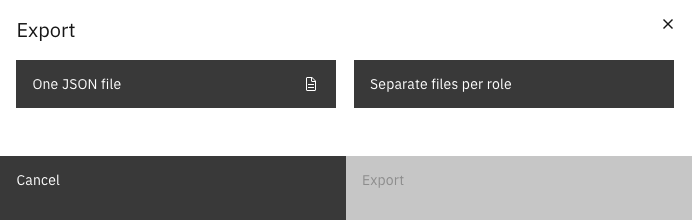
Choose an export format
Export options
{% endstep %}
{% step %}
Click **Export** to download the file(s)
{% endstep %}
{% endstepper %}
| Option | Description |
| ----------------------- | ----------------------------------------------------- |
| One JSON file | All selected roles in a single file |
| Separate files per role | One JSON file per role (downloaded as separate files) |