> For the complete documentation index, see [llms.txt](https://docs.valtimo.nl/llms.txt). Markdown versions of documentation pages are available by appending `.md` to page URLs; this page is available as [Markdown](https://docs.valtimo.nl/configuration-guides/access-control/context-conditions.md).
# Context conditions
Context conditions control when a permission applies based on how a resource is accessed. A resource can be accessed directly (e.g., starting a new case from the case list) or within the context of another resource (e.g., starting a process from within a case).
***
## Context modes
The Context section in the permission editor provides three modes:
Context mode selector
| Mode | Description |
| ------------------------ | -------------------------------------------------------------------------------------------- |
| **No restriction** | Context is not considered — permission applies regardless of how the resource is accessed |
| **Only without context** | Permission only applies when the resource is accessed directly, not within a parent resource |
| **Specific context** | Permission only applies when accessed within a specific parent resource type |
***
## No restriction
The default mode. The permission applies whether the resource is accessed directly or within a parent resource. Context is ignored entirely.
Use this when the permission should apply universally, regardless of navigation path.
***
## Only without context
Only without context mode
The permission only applies when the resource is accessed on its own — not within any related resource.
### Example
A permission on `OperatonExecution` (process start) with "Only without context" would:
* **Apply** when starting a standalone process from the process overview
* **Not apply** when starting a process from within a case
***
## Specific context
Specific context mode with resource selection
The permission only applies when the resource is accessed within a specific parent resource type. You can optionally add conditions on the context resource to further restrict access.
### Configuration
| Property | Description |
| ---------------- | ------------------------------------------------------------------------------------------------------------------------------------- |
| Context resource | The parent resource type that must be present |
| Conditions | Optional conditions on the context resource (same syntax as regular [conditions](/configuration-guides/access-control/conditions.md)) |
### Example
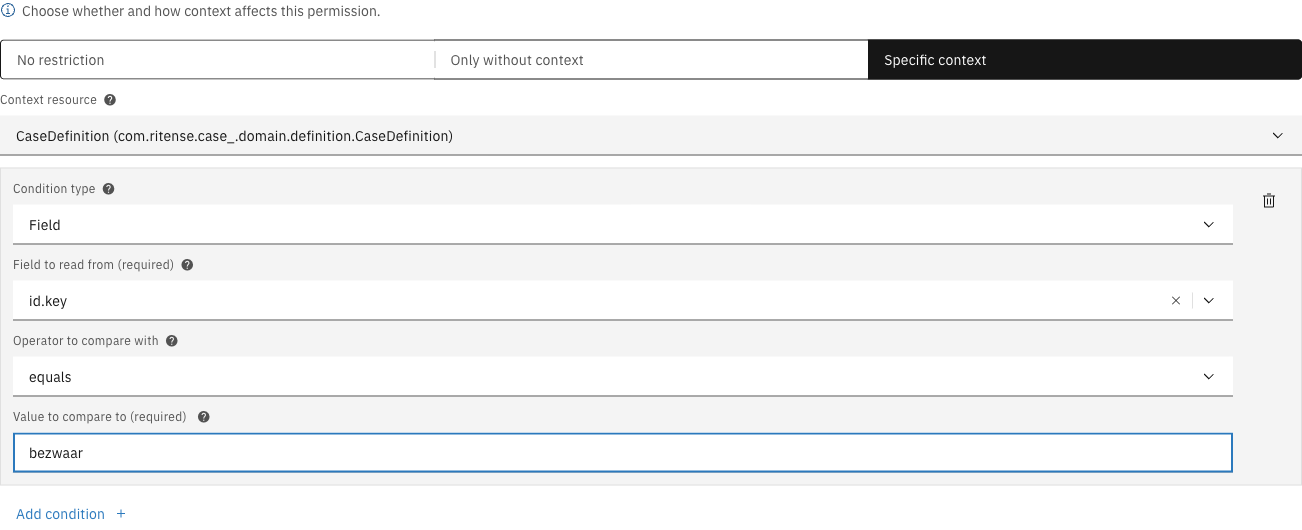
A permission on `OperatonExecution` (process start) with context resource `CaseDefinition` and a condition `id.key = bezwaar` would allow processes to only be started within the context of a specific case type:
Specific context with condition configured
* **Apply** when starting a process from within a "bezwaar" case
* **Not apply** when starting a process from other case types
* **Not apply** when starting a process without a case context